Article: 50088
Overview
Form 6252, Installment Sale Income, is used to report income from an installment sale under the installment method. This method allows taxpayers to spread the gain from a sale over multiple years, receiving at least one payment after the tax year of the disposition.
This article explains the purpose of Form 6252, who should file it, what types of transactions qualify, and how to correctly access and complete the form within your tax software.
Purpose of Form 6252
Form 6252 should be used to report:
- An installment sale, defined as the sale of property where at least one payment is received after the tax year of the disposition.
- The year of the sale (initial disposition), and all subsequent years—regardless of whether a payment is received in those years.
- The final year when either the last payment is received, or the obligation is otherwise disposed of.
- Note: An installment sale typically does not include:
- Dispositions of personal property by someone who regularly sells such property.
- Sales of real property held for sale to customers in the ordinary course of business.
However, exceptions apply, such as:
Dealers in real property.
Farmers disposing of property used or produced in their trade or business.
How to Add Form 6252
To add Form 6252 – Installment Sale to your return:
- Go to the Federal taxes section.
- Click on the Review tab on the left-hand side.
- Select I’d like to see the forms I’ve filled out or search for a form.
- In the search box, enter Form 6252 or go to the Taxes tab.
- Click on Form 6252 –Installment Sale to open the form.
- Fill in the applicable information.
- Click Save to apply changes.
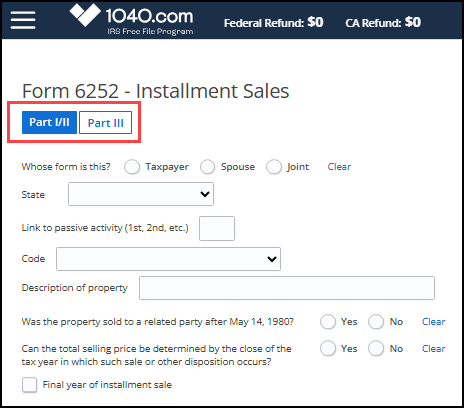
The Form 6252 screen is broken into two tabs. The first tab is for Form 6252 Part 1 and Part II and contains both the current and prior year selling information. A second tab for Part III allows you to enter information regarding a sale to a related party.