
Article: 50117
Overview
Form 2441 is the IRS form for Child and Dependent Care Expenses. The IRS uses the information on Form 2441 for a few different purposes, including:
- If you paid someone to care for your child or other qualifying person so you (and your spouse if filing jointly) could work or look for work, you may be able to take the credit for child and dependent care expenses.
- If you received dependent care benefits as part of your employment compensation, you would use Form 2441 to record their application.
- To maintain a record of active care providers
Add Form 2441
To find Form 2441 – Child and Dependent Care Expenses:
- Click on Federal Taxes > Review > I’d like to see the forms I’ve filled out or search for a form.
- Select the Credits tab.
- Click on Form 2441 – Child and Dependent Care Expenses to add and open the form.
Multiple Dependents
You do not need to complete a separate Form 2441 for each dependent. Instead, enter each dependent’s care expenses individually. The total will be automatically summed and shown on Form 2441.
If you paid $600 each for three dependents, you’ll enter $600 under each dependent’s screen. The total $1,800 will be reflected on Form 2441.
Multiple Providers
Form 2441 allows you to enter information for multiple care providers.
You will be prompted to enter the name, address, and taxpayer identification number (TIN) for each care provider. If you have additional providers, you will be given the option to add more.
No Provider ID Number
You must still complete Form 2441 even if you are unable to obtain a provider’s TIN.
Check the box indicating that the TIN is not available.
In some cases, you may be required to explaining your efforts to obtain the number.
Expenses and 2441 Don’t Match
You will want to double-check your dependent forms (in the How much did you pay for care expenses in ? section), and the amount of expenses you provided on your 2441.
The Form 2441 total should be the sum of all dependent care expenses on your Dependent screens.
For example, if you paid $1,800 in total care expenses between 3 dependents, you would enter $1,800 on Form 2441; however, you would only enter $600 for each Dependent screen.
State Specific Information
On Form 2441, under the entry field for the question How much was paid to this provider during ?, there is blue text that reads, I need to add state information for this provider. When you click this text, you will be presented with the state options for that care provider.
If you have multiple providers, you will need to do this for each one.
Credit Is Not Allowed
You may not qualify for the Dependent Care credit if:
- you (or your spouse, if MFJ) do not pay someone to care for one or more qualifying persons,
- you (and your spouse, if MFJ) did not work or look for work,
- your income level is not within the income limits set for the credit.
- you are married but are filing MFS (Married Filing Separate)
See IRS Publication 503 for more information on eligibility and exceptions.
No Dependent
In some cases, you may receive Dependent Care Benefits as part of your employer-provided benefits, reported in Box 10 of your Form W-2. However, you might not be claiming a dependent on your tax return. This discrepancy can trigger the following filing error if Form 2441 (Child and Dependent Care Expenses) is not included with your return.
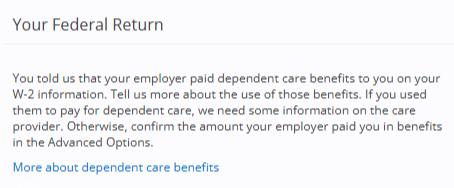
- Under the error message, click the link More about dependent care benefits.
- Click Next.
- Answer the disability question as it applies to your situation.
- On the next page, you are prompted to provide identifying information for your care provider. As you did not have one, you will click No Care Provider During 20YY, then Next.
- Click Advanced Options.
- Under Employer-provided dependent care benefits received in 20YY enter the totals from Form W-2, box 10 in the boxes For you and For your spouse.
- Click Save.